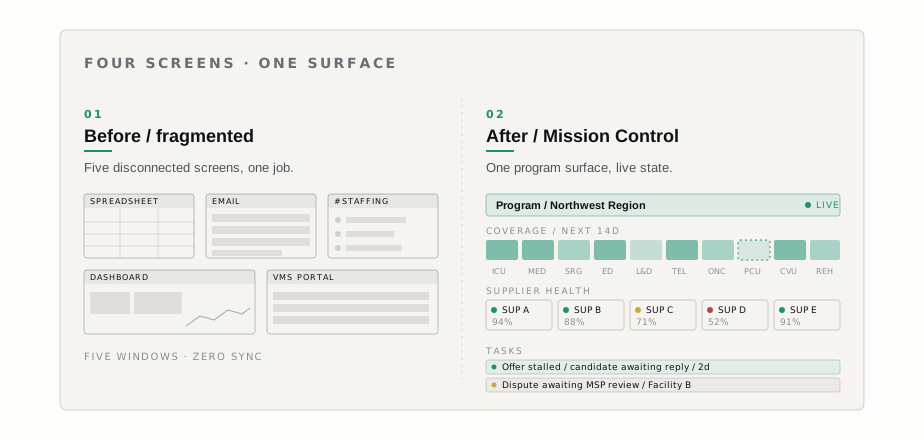
It’s 7:42 AM on a Monday. The program manager at a multi-hospital system opens her laptop and starts the same routine she’s been doing for two years. One tab to the VMS portal to see what shifts are still open. A second tab to a shared spreadsheet listing agency assignments by unit, last updated Friday by someone in another time zone. A third tab to Slack, where the night float charge nurse left a message about a no-show on a med-surg floor. A fourth tab to her inbox, where a supplier has emailed about a candidate who’s been waiting on credentialing for nine days. Stand-up is at 8:00. She needs to know which units are short, which suppliers are pulling weight, and which candidates are stuck. She has eighteen minutes.
None of those four screens were designed for her job. The VMS portal was designed for a single shift transaction. The spreadsheet was designed by whoever needed it last quarter. Slack and email weren’t designed at all in the sense that matters here. The work she does---running a program---happens in the gaps between those screens, in her head.
This is the program manager job across the contingent workforce industry. The work is real and the people are excellent. The tools they’ve been given are not.
Mission Control is the surface we built for them.
The job to be done
A VMS program manager is responsible for one or many hospital systems’ contingent workforce programs. The daily job:
- Know which open shifts across every unit are at risk of going unfilled, and which suppliers are most likely to fill them.
- Know which active assignments need attention: extensions, replacements, performance issues, credentialing expirations.
- Watch supplier behavior. Who’s submitting on time? Who’s ghosting? Who is winning the most starts and on which units?
- Move candidates through the offer-to-start flow, unsticking the ones who stall.
- Communicate with the MSP, the suppliers, the facility partners, and the central program ops team.
- Report on program health: fill rate, time-to-fill, supplier mix, cancellation rate, dispute volume.
Generic dashboards fail at this job for a specific reason. Dashboards organize around the question what does the user want to see right now? A program manager’s answer is not stable across the day. At 7:30 it’s tonight’s coverage. At 10:00 it’s the supplier QBR she has at noon. At 2:00 it’s the three candidates who haven’t responded to offers. The unit of work is the program; the lens onto it shifts.
A surface organized around the program lets the manager pivot lenses without changing screens. A generic dashboard forces her to build the program view in her head every morning.
The product shift: organize around the program
The first design decision was the unit of organization. The early sketches looked like everyone else’s sketches: a left rail of features, a main panel of a chart, a right rail of notifications. We showed those to a half-dozen program managers and got back a polite version of this is the same product I already have, with nicer typography.
So we rebuilt around a single noun: the program. A program is the contingent workforce program for one hospital system, one MSP relationship, or an explicitly scoped subset of either. Mission Control opens to that program’s current state. Coverage, suppliers, candidates, tasks, and metrics all show through the program lens by default. A program manager who runs three programs switches between them at the top of the surface. A program manager who runs one never thinks about it.
What this changed, concretely:
- Filters became sub-views, not configurations. When “ICU at Facility B for the next 72 hours” is a frequent question, it shouldn’t be a filter the user reconstructs every time. It’s a sub-view of the program, savable, shareable, and persistent.
- Notifications became tasks. A supplier ghosting on a submission isn’t a notification to dismiss. It’s a task on the program, owned by someone, with a state.
- Metrics moved out of a separate “analytics” module. Fill rate, time-to-fill, and supplier mix sit inside the program view, next to the shifts and suppliers they describe.
This sounds obvious in writing. It wasn’t obvious in the room. Most of the existing VMS market is organized around the transaction (one shift, one assignment, one candidate) and the report (a static export of the transactions). Organizing around the program meant giving up the idea that a single “dashboard” would satisfy anyone.
What we kept, what we dropped
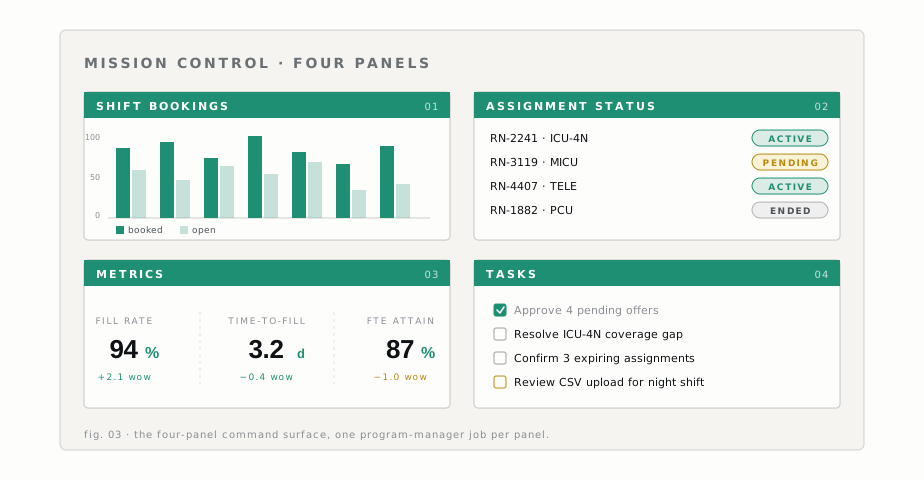
Mission Control ships with four panels on the program view. Each kept decision has a corresponding drop.
| Kept | Dropped |
|---|---|
| Shift bookings. Live open/filled/at-risk shifts grouped by unit and shift type, default 14-day window, drill into a shift to see supplier notify and submit state. | A configurable widget grid. Configurability is where products go to become unusable. |
| Assignment status. Assignments needing program-manager attention first: ending in the next 21 days, flagged for performance or credentialing, or with open disputes. 21 days is the practical extension window. | A real-time activity stream. Three operators told us it added noise without changing what they did. |
| Metrics. Five metrics---fill rate, time-to-fill, cancellation rate, supplier mix, dispute volume---each with a trend line and a comparable benchmark. | The long tail of derived metrics from earlier dashboard designs. Most weren’t being looked at; the ones that were could be reconstructed from the five. |
| Tasks. A queue of program-scoped tasks (stalled offers, missed submission SLAs, aging credentialing items, disputes awaiting MSP review) with owners, states, and audit. | Per-shift commentary fields. Slack already exists, and a worse Slack inside a product is not a feature. |
This is the part of the product where opinion has to win over flexibility. A surface that does six things well for a job we understand is more useful than one that can be configured to do twelve things badly for jobs we don’t.
The dashboard ops staff needed (that customers will never see)
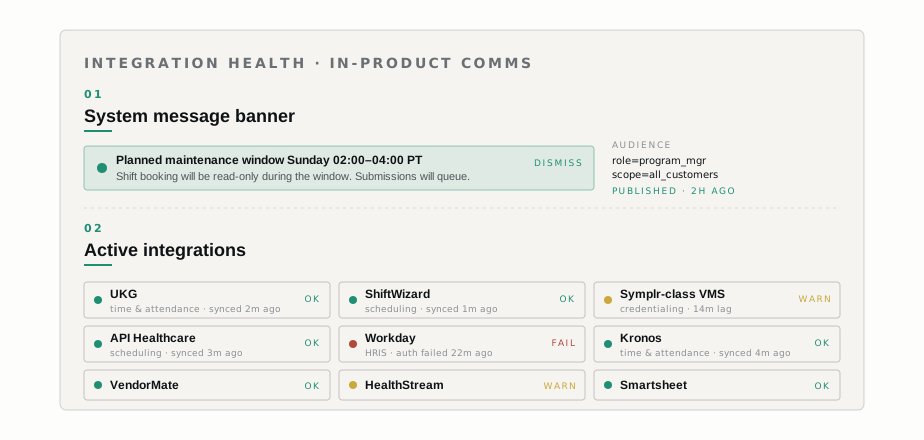
Mission Control is the customer-facing surface. What makes it trustworthy in production is a second surface customers never see: the Active Admin integration-status dashboard, which our internal operations staff use to know whether every integration the product depends on is currently healthy.
Hospital contingent workforce runs on a stack of integrations: scheduling systems, time-and-attendance systems, credentialing systems, the VMS’s upstream and downstream connectors. Each integration is a contract with another team’s API, and contracts drift. A scheduling system upgrades a version. A credentialing system rotates a credential. A time-and-attendance system silently caps API rates on Mondays. When any one of these breaks, the consequences flow downstream into the customer surface in ways easy to misread as a Mission Control bug.
We shipped the Active Admin “Active Integrations” panel this month for one reason: the people doing customer support and onboarding need a live view of integration health that doesn’t require pinging an engineer. Before this panel existed, the question is the UKG sync running cleanly for this customer right now? required a Slack ping, a log query, and a developer. After the panel, it’s a glance.
The panel shows every active integration across the customer base, grouped by integration type. Integrating with UKG is one connector among many the dashboard watches, alongside other scheduling and credentialing systems in the hospital stack. Each tile shows integration type, customer, current health (green/amber/red), last successful sync timestamp, and a one-line reason on amber and red. Clicking through opens the recent sync history and the underlying error, if there is one.
One design choice is worth flagging. Ops staff have their own surface, separate from the customer-facing one. A common temptation in this kind of product is to put a thin admin view on top of the same components the customer sees. That breaks down quickly. Customers want a surface about their program. Ops staff want a surface about the whole fleet of integrations and customers. Those are different products. Active Admin is where the fleet view lives, designed for the operator’s job, not bolted onto the customer’s view.
In-product communication, instead of email
The other piece we shipped this month is system message banners. Admins can push a message to all (or a subset of) Works web users, and it appears in the product the next time they load the surface. The use cases are concrete: planned maintenance windows, a policy change for a specific MSP relationship, a heads-up about a temporary integration issue, a reminder before a fee schedule changes.
Why this matters: email is where program-manager communication goes to die. A program manager processes hundreds of emails a day. A banner inside the surface they’re already using catches the eye in the right context. We targeted it carefully---banners scope to a customer, a role, or a program---because untargeted in-product messaging trains users to ignore it.
Banners are dismissible, audited, and time-bounded. We didn’t build a marketing channel. We built a product channel for product messages.
--- Engineering